SMS Consent & Message Flow
Last updated: July 13, 2026
This page documents how consumers consent to receive text messages sent through ShopConnect Pro, exactly what those messages contain, and how a recipient stops them. It is the authoritative description of our call-to-action and message flow.
Contents
1. Who Sends, and to Whom
ShopConnect Pro LLC provides payment software to service businesses (auto repair shops, home-service contractors, clinics, salons, and similar merchants). When one of those merchants issues an invoice or repair order to their own existing customer, ShopConnect can deliver that invoice and a secure payment link to the customer by text message.
Messages are strictly transactional. They relate to a specific invoice or repair order that the recipient is a party to. We do not send marketing, promotional, or advertising messages, and we never text a consumer who is not an active customer of the merchant. Recipient phone numbers are never purchased, rented, appended, or shared, and they are used only to deliver that customer's own invoice.
2. How Consent Is Obtained (Call to Action)
Consent is enforced in software, not assumed.
The customer provides their mobile number directly to the merchant as part of the service they are already receiving — at the counter, on an intake or repair-authorization form, or when the invoice is created.
Before any text can be sent, the merchant reads or shows the customer this disclosure, word for word:
This script delivers all four required consumer disclosures — the message type, the expected frequency, "message and data rates may apply", and the opt-out instruction — at the moment consent is collected, before any message is sent. The customer agrees, and only then can the merchant proceed.
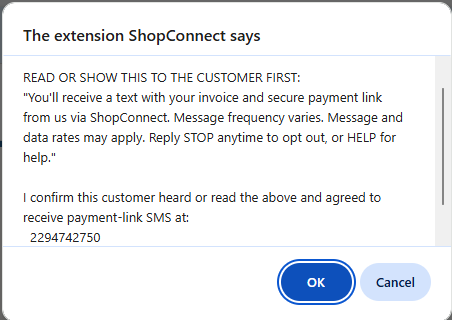
ShopConnect then blocks the text from being sent unless the merchant affirmatively attests that this script was delivered and the customer agreed. Before any SMS leaves the system, the ShopConnect interface interrupts the send with a mandatory consent gate that displays the disclosure script and names the exact destination number. If the merchant declines, the message is aborted and nothing is sent.
Every attestation is recorded against the transaction with a timestamp, the attestation source, and the version of the disclosure script the customer received — so each individual message we deliver is traceable back to a specific, affirmative consent event and the exact wording it was given under.
3. The Consent Gate, Verbatim
This is the exact dialog a merchant must clear before ShopConnect will send a payment-link text (rendered by the browser as a native confirmation dialog). It cannot be bypassed, disabled, or defaulted to "yes".
Choosing Cancel produces: "Consent required — customer must agree to SMS before we can send a payment link," and no message is transmitted.
Actual screenshot of the enforced dialog as it appears in the ShopConnect extension, captured on a live invoice:
4. Message Samples
Bracketed values are replaced with the real invoice's details at send time.
- [merchant business name] via ShopConnect: Hi [customer name], your invoice #[invoice number] for $[amount] is ready. Pay here: https://pay.shopconnectpro.com/pay.html Reply STOP to opt out.
- [merchant business name] via ShopConnect: we received your payment of $[amount] on invoice #[invoice number]. Thank you! Reply STOP to opt out. Msg&data rates may apply.
Every message identifies both the merchant and ShopConnect (the registered brand), and carries opt-out instructions.
5. Opt-Out and HELP
A recipient can stop messages at any time by replying with any of: STOP, STOPALL, UNSUBSCRIBE, CANCEL, END, QUIT, REVOKE, or OPTOUT.
On opt-out the recipient receives a single confirmation: "You have successfully been unsubscribed. You will not receive any more messages from this number. Reply START to resubscribe." No further messages are sent to that number.
Replying HELP or INFO returns: "Reply STOP to unsubscribe. Msg&Data Rates May Apply." along with our support contact.
6. Frequency, Rates, and Limits
- Frequency: messages are event-driven, not recurring. A customer typically receives one message per invoice, plus an optional payment confirmation.
- Message and data rates may apply. Carriers are not liable for delayed or undelivered messages.
- Volume limit: sending is capped at 100 messages per merchant per 24 hours, enforced in our platform, to protect consumers from bulk or blast messaging.
7. Privacy and Terms
Mobile information is never sold, rented, or shared with third parties or affiliates for marketing or promotional purposes. Phone numbers are used solely to deliver the customer's own invoice and payment link on behalf of the merchant.
- Privacy Policy: shopconnectpro.com/privacy
- Terms of Service: shopconnectpro.com/terms
8. Contact
- Company: ShopConnect Pro LLC
- Support: [email protected]
- Website: shopconnectpro.com